

Learn from past replies to other customers
ReplyRabbit can check each draft against answers your team already sent to other customers, and add a fact the draft was missing. Turn it on per mailbox under ReplyRabbit settings, Knowledge sources, Learn from past replies. It's off by default, it's in Beta, and it needs a Pro or Team plan.
What it does
The draft is written as usual, from the conversation and your knowledge sources. Then ReplyRabbit looks for earlier questions from other customers that resemble the new message and reads the answers your team sent. If one of those answers holds a useful fact that your docs and the draft don't, the draft is updated to include it. If there's nothing new, the draft is left exactly as it was.
- It only adds facts. Tone, greeting and structure stay as drafted.
- Personal details from the other customer's conversation are masked before anything is stored, and the updated draft is checked for them again.
- It can add up to two short AI calls to a draft, so it uses a little more of your AI allowance.
- Drafts you ask for by hand aren't checked unless you tick Also check manual drafts, because the check can add a few seconds of waiting.
Matching works by keywords. With the Semantic Search plugin installed and indexed, it also matches by meaning, so a question worded differently still finds the right answer. Without the plugin, keyword matching works on its own.
Before you start
- A Pro or Team plan. On Free the switch is shown but can't be turned on.
- A FreeScout administrator account. Other users can see the setting but can't change it.
- The FreeScout background queue running, which ReplyRabbit already needs for drafts.
- Some history: the mailbox needs replies your team sent in the last 3 to 12 months.
Turn it on

Open Answers to other customers
Open the mailbox, then ReplyRabbit settings. In the status panel at the top, select Answers to other customers. It takes you to the Knowledge sources card.Switch on Learn from past replies
Find Learn from past replies in the Knowledge sources card and switch it on.Choose how far back to look
Pick the last 3, 6 or 12 months. 12 is the default.Save your settings
The learning buttons only work once the switch is saved.Check how much there is
Select Check how much there is. It counts the replies it can use and tells you how many will be skipped and why. This doesn't use AI.Start learning
Select Start learning and confirm.
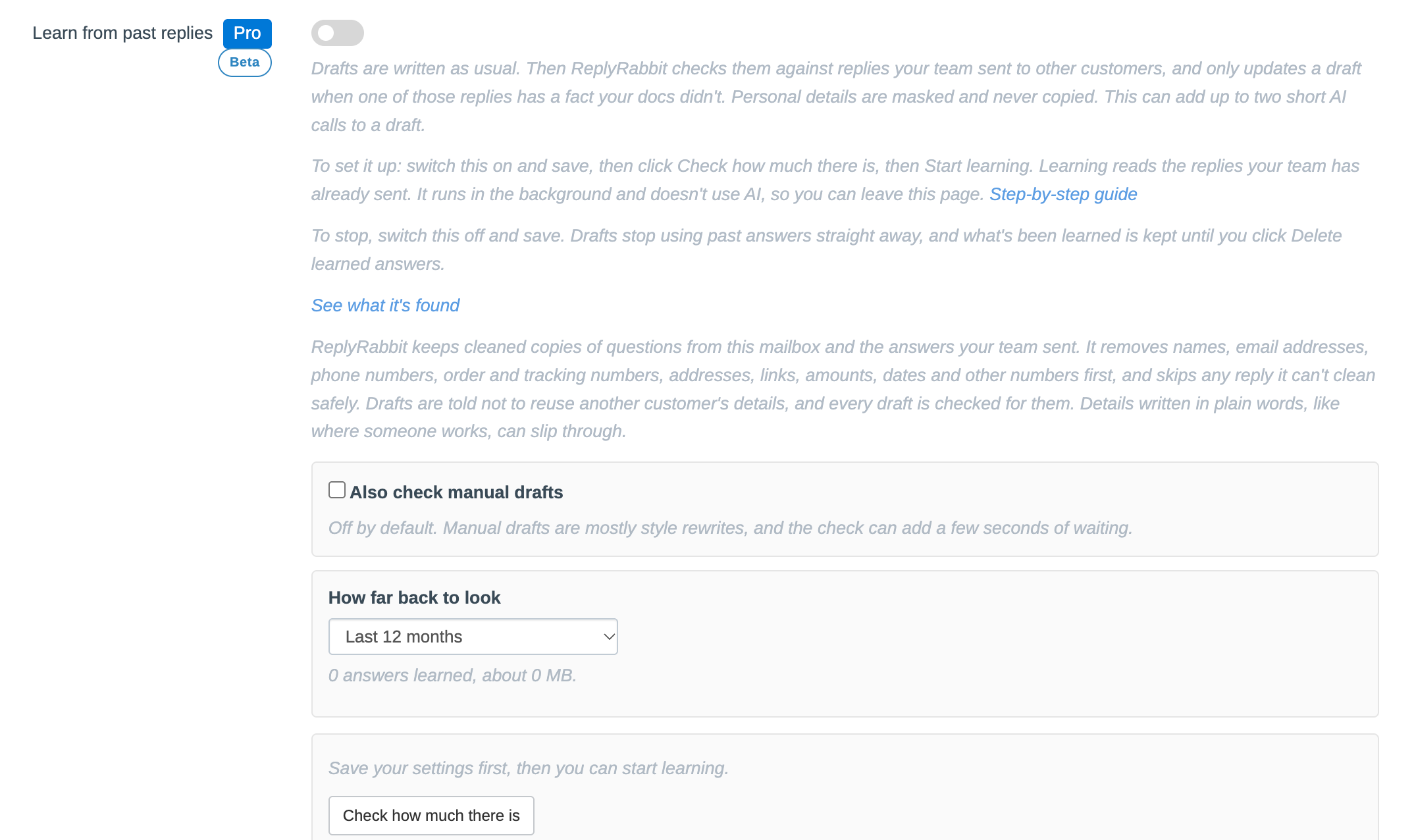
Learning means reading your team's sent replies, cleaning out personal details, and storing each question with its answer. It runs in the background and doesn't use AI, so you can leave the page. A progress line shows how many replies have been looked at, learned and skipped. You can pause, resume or cancel it. Once answers are learned, new drafts are checked against them, and new replies are added as your team sends them.
See what it's found
Under the switch, See what it's found opens the Past replies activity page. It shows how many drafts were checked, how many had a matching reply, how many had a new fact, and how many were changed, along with the extra tokens used. Administrators can also open a row to compare the first draft with the updated one. That text is kept for 30 days.
For the first six weeks after you turn it on, about one in five drafts that had a new fact is left unchanged on purpose. That gives the activity page two groups to compare, so you can see whether the updates help.
Turn it off or start again
- To stop, switch Learn from past replies off and save. Drafts stop using past answers straight away. What's been learned is kept, so you can switch it back on later.
- To remove what's been learned, select Delete learned answers. This can't be undone. If the switch is still on, new replies are learned again as they're sent.
- To keep less, choose a shorter period under How far back to look and save. Older entries are removed in the background.
What's stored
ReplyRabbit keeps one entry per distinct reply: the question, the answer your team sent, and when. Names, email addresses, phone numbers, order and tracking numbers, addresses, links, amounts, dates and other numbers are replaced with placeholders before anything is stored. A reply sent many times is stored once.
- Only the last 3, 6 or 12 months are kept.
- Each mailbox holds at most 5,000 entries. Past that, the newest are kept.
- Replies that can't be cleaned safely are skipped, and the estimate counts them along with the reasons.
- Conversations filed to Spam, permanently deleted, or belonging to a customer you've erased are removed straight away. Conversations moved to the Deleted folder are removed by the next daily cleanup.
Everything is stored in your own FreeScout database. Only the masked text of a few matching answers is sent to your AI provider when a draft is checked.
What never carries over
Only general facts are taken from a past answer, such as how a product behaves or which setting fixes a problem. A fact is dropped if it looks tied to the other customer: a name, number, date, amount, price, code, address or link. After a draft is updated, ReplyRabbit checks it for details from the past answers, and if it finds one it keeps the first draft instead.
Details written in plain words, such as where someone works, can't always be spotted, so treat these checks as safeguards and read drafts before sending, as you already do.
Language and limits
This first release is built for English. Customer messages in other languages are matched on the words they contain, and the masking of names is weaker outside English: common first names and large cities are masked in German answers, but a less common name or a small town can survive, so check German mailboxes before relying on it. Languages written without spaces between words, such as Chinese, Japanese or Thai, are matched on short runs of characters instead of words. That search is slower on very large mailboxes and less precise than it is for English, and names written in these scripts are only masked when a title or greeting follows them, so check these mailboxes before relying on it.
Masking works from capitalisation and from words your own replies and docs use. It can miss a person or company written entirely in lowercase, and a personal detail that was paraphrased instead of named, such as a description of someone's job. Answers that look like they contain this kind of detail are skipped rather than stored.
Related
See How ReplyRabbit learns from your past conversations for the other sources a draft uses. Review Choosing an AI provider to understand the provider data path for your mailbox.