Connect your Outline wiki (self-hosted or getoutline.com cloud) to ReplyRabbit so AI drafts can draw on your team's knowledge base. Outline pages stay internal by default: used to help write replies but never shown or linked to customers, unless you explicitly mark pages as customer-viewable.
Use this when your team keeps knowledge in Outline instead of the FreeScout Knowledge Base module. If you use the FreeScout module, see How to connect your FreeScout Knowledge Base. Outline works well alongside ReplyRabbit because:
You control page access via Outline permissions, and ReplyRabbit reads only what your service user can access.
Pages stay out of customer replies by default, so your internal runbooks and vendor information never leak into drafts.
One sync per day plus manual "Sync now" keeps ReplyRabbit current without real-time webhooks.
If your Outline sits behind an SSO proxy (Cloudflare Access, Authentik, oauth2-proxy), you may need to adjust your proxy settings or use Outline's internal address.
Setup path
Create a service user
In your identity provider (your SSO system), create a dedicated user account like replyrabbit@yourcompany.com. This account becomes the "eyes" of ReplyRabbit inside Outline.
Sign in once to Outline
Have that service user sign in to Outline through your normal SSO flow. The account must exist in Outline before it can create an API key.
Grant access in Outline
Share the Outline collections or pages you want ReplyRabbit to use with that service user. Share them the same way you'd grant access to any tool like Onyx or internal wikis. Do not make the user an admin; a regular member with access to specific collections is enough.
Create an API key
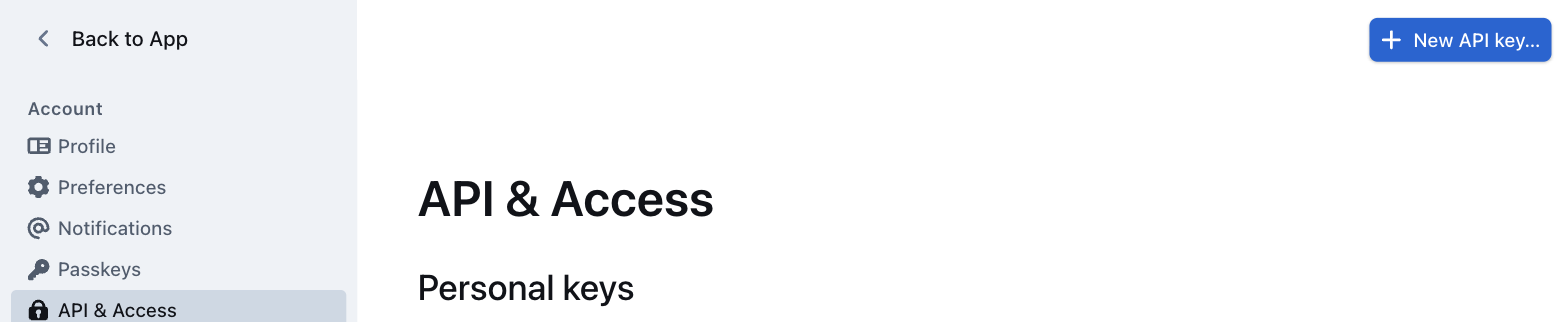
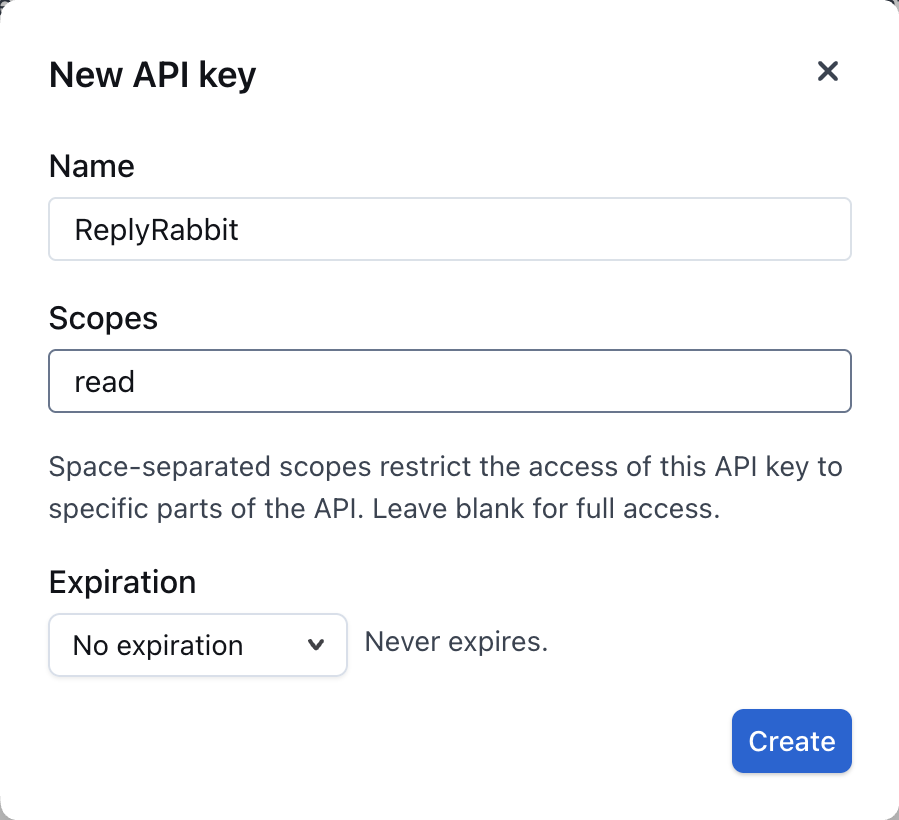
Sign in to Outline as that service user. Open Settings, then API & Access under Account, and click New API key. Older self-hosted versions call this page "API" or "API and Apps".Personal API keys live under your own account settings, not the workspace ones.Name the key ReplyRabbit, type read in Scopes, and set Expiration to "No expiration". Outline's default is 30 days, and syncing stops when the key expires. Click Create and copy the key.The read scope covers everything ReplyRabbit needs and blocks any writes.
Open ReplyRabbit settings
In FreeScout, go to the mailbox settings and find "Documentation sources" under ReplyRabbit.
Add Outline source
Click "Add Outline source". Paste your Outline URL (for example, https://wiki.company.com or your getoutline.com workspace URL) and the API key you just copied.
Choose what to sync
After pasting the URL and key, click "Test connection". It shows which Outline user the key belongs to, so you can check it's the service user and not a person's key. Then choose either "Everything this key can read" (recommended, matches Outline's own permissions) or "Only specific collections or pages", and tick them in the tree or paste a collection or page link.
Sync and test
Save your settings. Saving a new source, or changing its address, key or scope, starts a sync straight away. After that it syncs daily, and "Sync now" on the source runs one whenever you like. Then test a draft to confirm ReplyRabbit can use the content.
Privacy and security
Outline pages are internal by default. Page text is stored in FreeScout and sent to your AI provider and embedding provider (usually the same provider you use for drafts). Pages are never quoted word-for-word or linked to in customer replies unless you turn on "Customers can see these pages" for sources where every selected page is safe to share.
Only turn on "Customers can see these pages" if:
Every selected page opens and displays correctly without requiring a login.
The content is suitable for customers (no internal operations details, vendor information, or staff instructions).
Share only what's needed. If you share the entire Outline workspace with ReplyRabbit, everything the service user can read becomes available to the AI and stored in FreeScout. Share specific collections or pages instead, the same way you'd limit access for any other tool.
Handling internal network addresses
If your Outline runs on a private IP address or internal hostname (like outline.internal.company.com), turn on "Outline is on our internal network" when you add the source. This allows ReplyRabbit to:
Reach private IP addresses (10.x.x.x, 192.168.x.x, 172.16.x.x to 172.31.x.x)
Resolve internal hostnames via your network's DNS
Use HTTP (unencrypted) on private addresses only
Public addresses still require HTTPS, even with this option on. If your Outline uses HTTPS with a certificate from your own internal CA, your FreeScout server's trust store must include that CA certificate.
Handling SSO proxies
Outline's own sign-in: If your team signs into Outline through Google, Microsoft, Slack, OIDC, or email links managed by Outline itself, no extra setup is needed. The API key bypasses the sign-in flow.
SSO proxy in front of Outline: If something like Cloudflare Access, Authentik, or oauth2-proxy sits in front of Outline and intercepts requests, ReplyRabbit can't reach the API. You'll see an error message saying "Something in front of Outline is asking for a sign-in."
Fix this by choosing one of these approaches:
Bypass the proxy for /api/ only. Configure your proxy to let the FreeScout server reach /api/* directly without the sign-in check. Most proxies support path-based or IP-based bypass rules. Check your proxy's documentation for the setting.
Use Outline's internal address. If your Outline has a private IP or internal hostname that skips the proxy, use that in ReplyRabbit instead. You'll need to turn on "Outline is on our internal network" for private addresses.
If you can't bypass the proxy, contact your administrator to enable one of these options for ReplyRabbit's server.
Troubleshooting
"Outline is rate limiting requests. It will retry on the next scheduled run." Outline asked ReplyRabbit to slow down. The sync already waited as long as Outline asked and retried, and Outline was still busy, so it'll try again on the next daily sync. Pages that were already indexed stay available in the meantime. To retry sooner, click "Sync now" again in a few minutes.
"This Outline version is too old. Update Outline to 0.87 or later, then test the connection again." Your self-hosted Outline is missing an API method ReplyRabbit needs. Upgrade it to version 0.87 or later, then click "Test connection" again.
"This source is off. Turn on "Use this source", save, and sync it." The Outline source is turned off. Tick "Use this source", save the settings, then click "Sync now".
"Outline rejected that API key." The API key is invalid or has been revoked. Generate a new key in Outline Settings > API with the read scope.
"Could not reach Outline. Check the URL and try again." The URL is wrong, or ReplyRabbit can't reach the server. Confirm:
The URL is correct (for example, https://wiki.company.com, not the home page or a specific page).
If Outline is on a private IP or internal hostname, turn on "Outline is on our internal network".
If Outline is behind an SSO proxy, check the "Handling SSO proxies" section above.
"Enter the Outline API key first." Paste the API key into the field before testing or syncing.
"The Outline knowledge source is a Team feature." Your current plan doesn't include Outline integration. Upgrade to the Team plan to use this feature.
Minimum Outline version
Self-hosted Outline needs version 0.87 or later (tested on 1.0 to 1.10). Older versions are missing part of the API that ReplyRabbit uses to read page trees. Test connection checks for the missing page-tree API. If it reports an old version, update Outline first.
The cloud version at getoutline.com is always up to date and supported.
Switching sources later
Moving to a public documentation site: If you later want to switch to a public website (instead of keeping Outline internal), add a Website documentation source and disable or remove the Outline source when you're ready. Both can run side by side during the move. Removing an Outline source hides its pages from drafts and deletes them from ReplyRabbit's storage.
Downgrading from Team: If you downgrade from the Team plan, your Outline sources and API settings stay in the database but the synced pages are deleted and become unavailable for draft retrieval. Your source configuration is preserved, so when you upgrade back to Team, you can sync them again without re-entering the URL and API key.